Phase V
How well did Kidspiration Work?
Data Summary
The main objective of the Capstone project is for the target students to increase the quality and quantity of their writing by writing a full paragraph with 5 or more complete sentences using Kidspiration software. Based on the results, the study showed that the students significantly improved their writing. As seen in table 1.1, the students' raw scores shows the differences in the students' writing between the Free Writing and Kidspiration Writing. In table 1.2, the students' raw scores were converted to percentages for comparison purposes. In the fourth column of table 1.2, the difference in the students' scores was calculated to find the average score of improvement. From the data the class improved their writing with Kidspiration with an average of 57%.
Table 1.1 Raw data of students' Free writing and Kidspiration Writing Rubric scores. The possible total score is a 20.  *Note: Click on the image to get a larger view of the figures. This will take you to another page. To go back to this page click the back button on your browser. | Table 1.2 Converted Free Writing and Kidspiration Writing Rubric scores in percentages and class average score increase.  |
Data Interpretation
Before the target students used Kidspiration, the teacher had the students choose a topic of their interest in a free writing activity. This free writing activity allows the teacher to see how students organize and express their thoughts on paper without specific rules or directions. As seen in figure 1.1, 1.2 and 1.3, a below grade level, on grade level, and above grade level student sample is shown to illustrate the writing trend. Majority of the students had difficulty writing a succinct and coherent writing piece in the free writing activity. There were several incomplete and run-on sentences. The students' free writing papers showed that the students were not developmentally ready to organize and express their thoughts on paper on their own. In informal observations of the free writing activity, students were more preoccupied with the formation of their letters and spelling of their words rather than the content of their writing. Even when students attempted to spell to the best of their ability, the students’ spelling were illegible. The students had to read aloud what they wrote in order to comprehend what was written.
Figure 1.1 Below Grade Level Student Free Writing Sample  Figure 1.3 Above Grade Level Student Free Writing Sample  | Figure 1.2 On Grade Level Student Free Writing Sample  *Note: Click on the image to get a larger view of the figures. This will take you to another page. To go back to this page click the back button on your browser. |
In figure 1.4 the students’ scores were put into a line graph to illustrate the student’s improvement in their writing. The blue line (Free Writing scores in percentages) showed that all of the students scored between 20% - 75%. No student scored above 75%. On the red line (Kidspiration Writing scores in percentages) showed that all of the students scored between 80% - 100%. No student scored below 80% showing that all of the students increased their writing proficiency with the help of Kidspiration. As explained in the data summary the entire target group improved their writing with Kidspiration at an average of 57%. The increase in student achievement with Kidspiration increased for two main factors: kid-friendly software; and motivation.
Figure 1.4 Comparison of student writing between Kidspiration Writing score and Free Writing Score.

*Note: Click on the image to get a larger view of the figures. This will take you to another page. To go back to this page click the back button on your browser.
Kidspiration's kid-friendly features impacted the level of student improvement in writing because it broke down the complexity of thought organization into a simplistic form. According to Seifert et. al. " the structure, or architecture, of memory may affect how children can learn during the school years . . . a younger student who can remember only three bits of information needs to have information organized in smaller chunks than an older student who can remember six bits at a time" (278). With that said, allowing students to be able to have the freedom to break down their own thought processes in a graphic organizer will allow students to organize information on their developmental level. The two view modes of Kidspiration are Picture and Writing. The picture view is where the students create a graphic organizer and use simple commands like add symbol, link symbols, and erase. The simplicity of the names of the commands made it easier for students to understand what each feature can do. Not only are the commands are simple, but the features are accompanied with sounds in which text or icons are spoken to them when hovering their mouse over the icon or clicking on the text. Students can easily identify a certain command/feature both visually and aurally. In writing mode, students can convert what was created in picture mode into an outline and include complete sentences or notes for each topic or detail that was created in picture mode. In figure 1.5 and 1.6, a screenshot of the teacher's picture and writing sample is shown to see the different features of the software.
Figure 1.5 Teacher Sample - Picture Mode in Kidspiration  | Figure 1.6 Teacher Sample - Writing Mode in Kidspiration  |
*Note: Click on the image to get a larger view of the figures. This will take you to another page. To go back to this page click the back button on your browser.
Even though low typing skills played a factor in the use of Kidspiration, the students didn't have as much difficulty compared to actual pencil and paper writing.
With Kidspiration, the majority of the students' level of motivation with writing has greatly increased. Earlier in the year, when students were given a writing assignment regardless of the topic or purpose for writing, the students were hesitant to begin the assignment. Because of the developmental level of the first grade students, writing is a very difficult concept for students to learn while still developing the basics of reading and fine motor skills to form letters. The target students were more focused on the formation of their letters and spelling, rather than the content of their writing. Introducing the Kidspiration software alone encouraged the students to do the writing assignment. The students perceived the Kidspiration software as an opportunity to use the computer rather than a tedious writing assignment. Typing in the words and using the text-read-aloud feature on Kidspiration also allowed the students to focus on the content of their writing, helping them hear if what was written made sense.
After the students completed their graphic organizer in picture mode of Kidspiration, the students converted their organizer into writing mode, to include details and complete sentences of their ideas. When the students saw how their graphic organizer was converted into writing mode, the students gained a better understanding of how a web can be turned into writing. In figure 1.7 and 1.8 shows how a couple of students work on Kidspiration, both in picture and writing mode.
Figure 1.7 Student Sample Picture and Writing Mode
 |  |
Figure 1.8 Student Sample Picture and Writing Mode
 |  |
*Note: Click on the image to get a larger view of the figures. This will take you to another page. To go back to this page click the back button on your browser.
In figure 1.9 and 1.10 shows a comparison of students writing in both free writing and Kidspiration writing. The topic the students used in the Kidspiration writing is the same topic they used in their free writing to allow the students to see the differences in their writing. To see all student free writing and kidspiration writing.
Figure 1.9 Student Sample Free and Kidspiration Writing Comparison

Figure 1.10 Student Sample Free and Kidspiration Writing Comparison

To see all student free writing and kidspiration writing click the PDF link. |
|

Figure 1.11 Student pre-writing activity preference. 94% of students preferred Kidspiration than any other pre-writing activity. 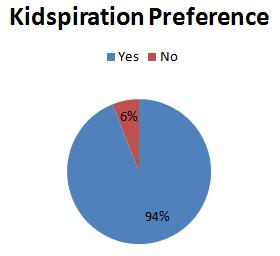 *Note: Click on the image to get a larger view of the figures. This will take you to another page. To go back to this page click the back button on your browser. | In a brief satisfaction survey (figure 1.11) with the students, majority of the students preferred the Kidspiration software for their pre-writing activity rather than a hand-written web, list, or four square. Webs and lists are other forms of pre-writing activities prescribed by the first grade reading curriculum that the students used to organize their thoughts. Webs are much like the Kidspiration software, but in written form. Lists lack a specific organization for students to write their thoughts. Four square (a technique that the teacher has adopted) is one of the most successful pre-writing activities, but requires a lot of guidance and prompting for students to complete. With four square, students are given a specific topic to write about and is asked to write four details about the topic in a complete sentence. As seen in figure 1.7 students take what they have written in each square and put them together in a paragraph for their final draft. |
How can it be improved?
Scheduling for computer time in this particular project was not difficult, but can be a problem, during standardized testing time when computers will be used. When it comes to teaching what is required by the county, scheduling can be very difficult. Having flexibility with your principal, your grade level team members, and computer teacher will allow successful scheduling and allotted time to complete writing activities on the computer. Another factor that will allow success with Kidspiration is continued student use and exposure to the software. Because it was the first time the students were to use this software, the students were becoming familiar and comfortable with the software. Repeated use will allow the students to be proficient users and the timing to complete a writing activity can be reduced to a week, which is the prescribed writing cycle in the first grade curriculum.
Although the students preferred to use the software, the target students had difficulty with the typing. In the student computer background knowledge inventory, the students had very little to no typing skills. Majority of the students typing style is either one or two finger typing. Because of the low level of typing experience for the first graders, weekly lessons and/or practice in typing can help benefit the students when completing a writing activity on the computer. Students would feel more comfortable and confident to use the Kidspiration software because of their increased skills in typing. This would also decrease the time it takes to complete an assignment.
Another reccommendation for this particular project it to have an aid or assistant to work with the class. The students' typing speeds become very tedious for students, especially below grade level students. The below grade level students particularly have difficulty because of their reading and comprehension level. Having the teacher as the class facilitator to monitor students work and progress while having an additional personal working one-on-one with struggling students would be very beneficial.
How to disseminate this innovation to others?
Professional Development:
Using Kidpsiration can be beneficial to any class no matter what grade level or subject area, especially for beginning and emergent readers and writers. The simplicity of this software and its ability to give the user the freedom to create a product gives endless possibilities. I highly recommend this software to any educator who aims to improve a child's ability to become a critical thinker and aware of their own thought processes on the child's developmental level, while at the same time encouraging teachers to integrate technology.
To share the ingenuity of this software with my colleagues, I would share it through professional development. For software that has been installed in our computers for years now, many of my colleagues didn't even know such software existed. I believe that all educators should take advantage of the resources that are provided, and to be educated on how to effectively use them.
In my professional development, I believe it is best that I introduce my experiences with teaching writing to first grade students and how Kidspiration helped my students improve their writing and become conscious about their thoughts and ideas. I would then model how to use Kidspiration and its different features in tutorials, much like the ones I used in this project. I can even create video tutorials for my colleagues to follow at their own pace and at their own time. The tutorials will be broken down into segments as explained in my timeline for the students: Kidspiration Introduction Lesson; Kidspiration Hands-On Tutorial 1; Kidspiration Hands-On Tutorial 2 (see description of lesson/tutorials in Phase III). I would even include tutorials on how Kidpsiration can be used in other content areas. Aside from writing with Kidspiration it even has other features that fit well with math, science, and social studies. It even has pre-made templates for teachers or students can use.
Overall, this study has been a success mainly because of its simplicity to meet the developmental level of beginning and emergent readers and writers. With all of the types of web 2.0 tools and educational software there is in the world, there are not very many that look at a child's developmental understanding of how information is organized.
References
Kidspiration. (2005). Kidspiration's users guide. Inspiration Software.
Seifert K. L., Hoffnung, R. J., & Hoffnung, M. (2000). Lifespan Development. Boston: Houghton Mifflin Company.
